Conversations,
not systems.
Turning every member call into a guided, automated and confident resolution for the healthcare advocate.
Healthcare advocates were working for their tools.
Advocates spend much of every call navigating fragmented systems, hunting for information, documenting and coordinating work by hand. As the organisation invested in AI, the opportunity was bigger than faster answers. Desktop of the Future (DoTF) redesigns how advocates work: AI assembles context, guides decisions, drafts documentation and routes work, so advocates can focus on the member.
The problem
To resolve one member's issue an advocate searches several systems, juggles screens, runs SOPs manually, re-enters data, writes notes and routes tasks to back-office teams, all while keeping the conversation warm.
Business cost
High average handle time, long training cycles, low operational efficiency, heavy documentation effort and an inconsistent member experience.
Human cost
Cognitive overload, constant context switching, fragmented information, low trust in AI and burnout.
Lower AHT
Cut average handle time without rushing the member.
Higher on-call resolution
Resolve the issue on the first contact.
Lower operational cost
Less rework, fewer wrong routes and repeat calls.
Less operational effort
Automate notes, cases and follow-ups.
See it in action.
A one-minute walkthrough of Desktop of the Future, from the advocate’s shift brief to a resolved member call.
Prototype walkthrough · 60 seconds
We sat beside advocates on live calls.
Observation, 1:1 deep dives and a survey, backed by call analytics. The goal was to see where a call actually loses time, and where the advocate loses the member's attention.
hours of live and recorded calls observed
advocates in 1:1 deep-dive sessions
advocates surveyed
Quantitative findings
Analytics & surveysFragmented tooling
Advocates switch between more than ten disconnected applications per call and spend about 35% of call time searching for member information.
Heavy after-call work
Manual notes and ACW take 3 to 4 minutes per interaction, pushing total handle time to 10–14 minutes.
High repeat inquiries
42% of calls come from members repeating information they already gave, because case handoffs between back-office systems were incomplete.
Qualitative findings
Interviews & stakeholder 1:1sContext-switching fatigue
Managing many tabs causes cognitive overload and missed details on complex claims and benefits calls.
Inconsistent knowledge discovery
Static SOP PDFs and manual searches lead to inconsistent guidance and slower resolutions.
A teammate, not a tool
Advocates did not want another app. They wanted help understanding the member, choosing the right answer and clearing the busywork.
“I don't want another tool. I want a digital teammate that helps me understand the member, guides me to the right answer, and handles the busy work.”
Healthcare advocate, 1:1 interviewA north star stakeholders could agree on.
I helped map the north-star vision so product, operations and engineering were solving the same three problems in the same order.
The conventional advocate journey
Seven hand-offs between the advocate and their tools, most of them invisible to the member.
We stopped designing screens and started designing decisions.
The biggest shift was in the questions we asked. Instead of mapping pages and buttons, every moment of the call was framed around intent and what the system should do on its own.
What buttons?
What flow?
The advocate drives the software step by step.
What decision?
What happens automatically?
The software follows the conversation and does the busywork. The advocate decides.
Eleven moments in a call, each with a job for AI.
We broke a call into the advocate's real jobs and defined, for each, what the system does automatically and how it shortens the call.
Identify caller
Auto-recognition and IVR verification; the profile is pre-fetched while it rings.
Understand issue
Real-time transcription and intent detection suggest the reason for the call.
Retrieve data
A unified panel loads claims, eligibility and benefits based on intent.
Analyse & decide
Next-best-action as guided choices: resolve, route or follow up.
Explain solution
Plain-language scripts translate policy into words a member understands.
Manage experience
Sentiment detection with empathy and tone prompts.
Escalate if needed
Warm transfer with the full context packaged for the specialist.
Route work
One-click routing with forms pre-filled from the conversation.
Document interaction
AI call summary with structured tags. The advocate edits, never types from scratch.
Create follow-ups
Pending actions become tasks with owners and due dates.
Close case
A closure checklist: resolved, next steps shared, promises logged.
AI does the busywork. The advocate owns every decision.
Each step suggests; nothing is submitted without review.
Seven stages, from ring to reflection.
The journey map set goals and the advocate's ideal inner voice for each stage. Those quotes became acceptance criteria for the design.
Know who is calling and why
I see it's Maria calling about her pharmacy issue. I know what she tried in IVR.
Build rapport quickly
As I greet Maria, I can see her account summary without searching.
Understand the issue deeply
The system highlights her last two events and a related article.
Solve efficiently, explain clearly
I explain the coverage in the same interface while confirming next steps.
Confirm and close confidently
She got an SMS confirmation. The summary is already written.
Minimise admin work
The summary and disposition look good. I add a comment and close.
Learn and reset
A nudge says my last 5 claim calls had high satisfaction. I'm ready for the next one.
One surprise bill, every layer behind it.
The blueprint follows Linda's surprise MRI bill from the statement landing to the corrected bill. It shows what the member sees, what Maya does, and the AI, teams and systems working out of sight at each step.
Designing for Maya, and the people behind her.
Maya anchors every decision on the desktop. Secondary personas made sure the components we built for her could be reused for back office, supervisors and operations.

Maya Thompson
“I want a digital teammate that helps me understand the member and guides me to the right answer in the moment.”
- Information spread across 10+ systems
- Answering the same questions again
- Long after-call work
- Switching between many screens
- Tracking follow-ups and case ownership
- Resolve issues on first contact
- Reduce handle time
- Build trust and rapport
- Never miss an important detail
- Give calm, personal guidance
Jordan Baille
Resolve escalated claims accurately within SLA.
Review escalationsValidate adjudicationCoordinate with providersIncomplete handoffsDuplicate researchSarah Nguyen
Keep advocates on quality, service and compliance standards.
Queue managementCoachingEscalationsDelayed insightsLimited case visibilityMichael Reed
Improve member experience while reducing operational cost.
Trends & insightsCapacity planningTransformationSiloed reportingReactive issue handlingFour destinations, one active session.
The app collapses to Home, Member/Provider, Cases and Knowledge Central. During a call everything converges on the Active Session, so the advocate never leaves the conversation to find something.
Inbound call to automated case creation
Orange marks where AI acts on its own. Outlined steps are where the advocate makes the call.
Shift brief, priorities, promises.
IVR-authenticated, intent shown, auto-accept in 3 s.
Consent and name/DOB confirmed by voice.
Explain, fix, protect, one at a time.
New intent detected mid-call.
Advocate ends the call.
Edit summary and fields, submit.
Making AI trustworthy at call speed.
Advocates reported low trust in AI. These six patterns repeat on every AI surface so the advocate always knows what the system is doing, why, and what it will not do without them.
Show the wait, honestly
Every AI step shows its state and elapsed time. Waiting with information feels shorter than waiting on a spinner.
Cite the source
Each answer carries the records and SOPs it used, so the advocate can verify in one click.
Reasoning on request
“View reasoning” expands the steps behind a suggestion. Collapsed by default so the call view stays calm.
Suggest, never send
AI drafts words, cases and summaries. Only the advocate speaks, submits or routes.
Objectives, not forms
The left rail turns the call into objectives that appear as the member raises them and tick off as they are resolved.
Feedback in the flow
Every card asks “Helpful?” with one tap. Ratings feed model tuning without a survey.
One call, start to finish.
The most common call a health plan gets: “Why did I get a bill for something that was approved?” Linda Mark has a $1,240 MRI bill, and this is her second call about it. Here is how DoTF helps Maya find the root cause, open two linked cases and win back Linda's trust in under four minutes.
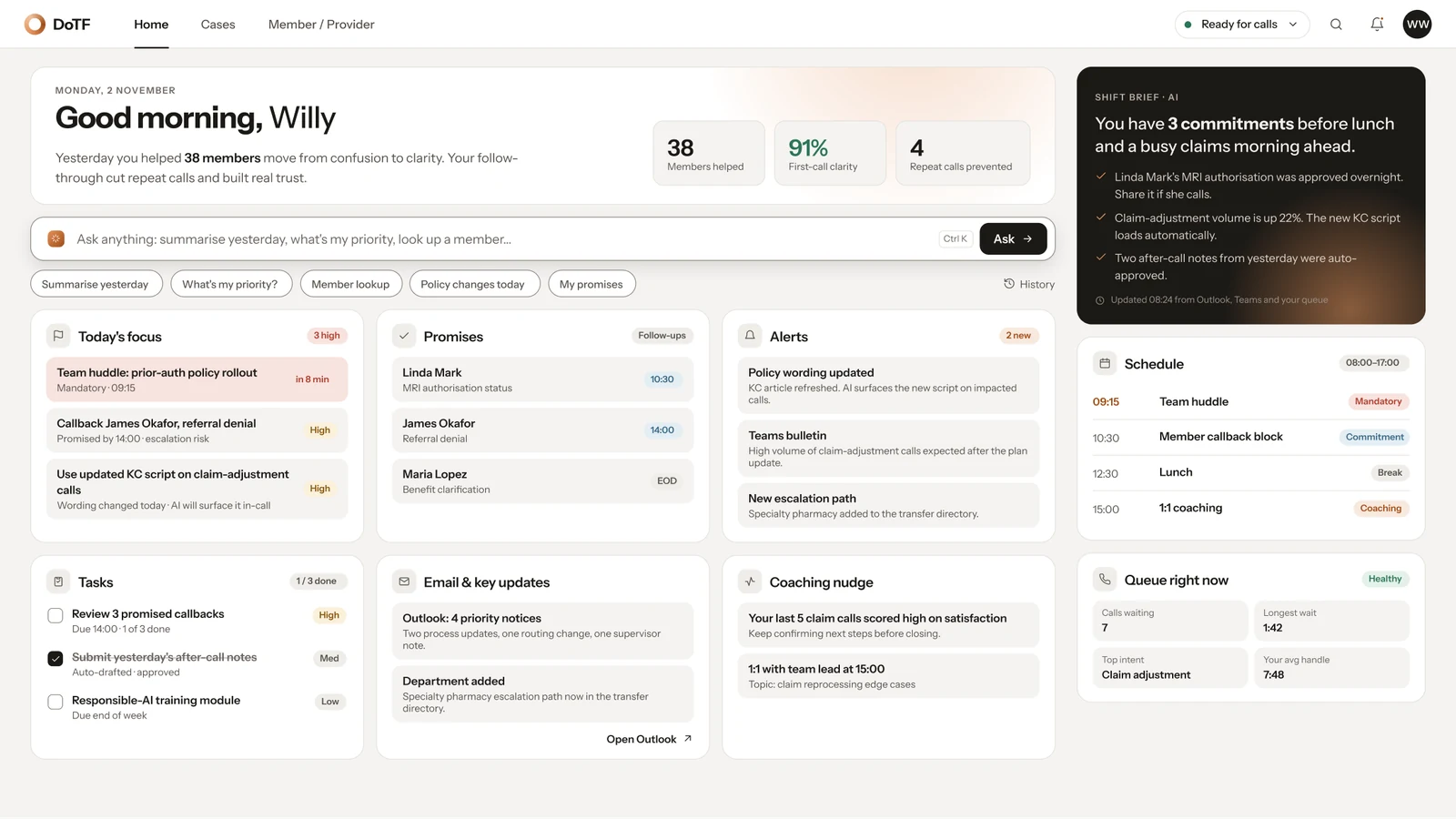
Start the shift already briefed
Home answers “what matters today” before the first call, including the fact that Linda's MRI authorisation came through overnight.
- AI shift brief merges Outlook, Teams and the queue
- Promises and callbacks sit next to the schedule
- Ask-anything bar with ready-made prompts
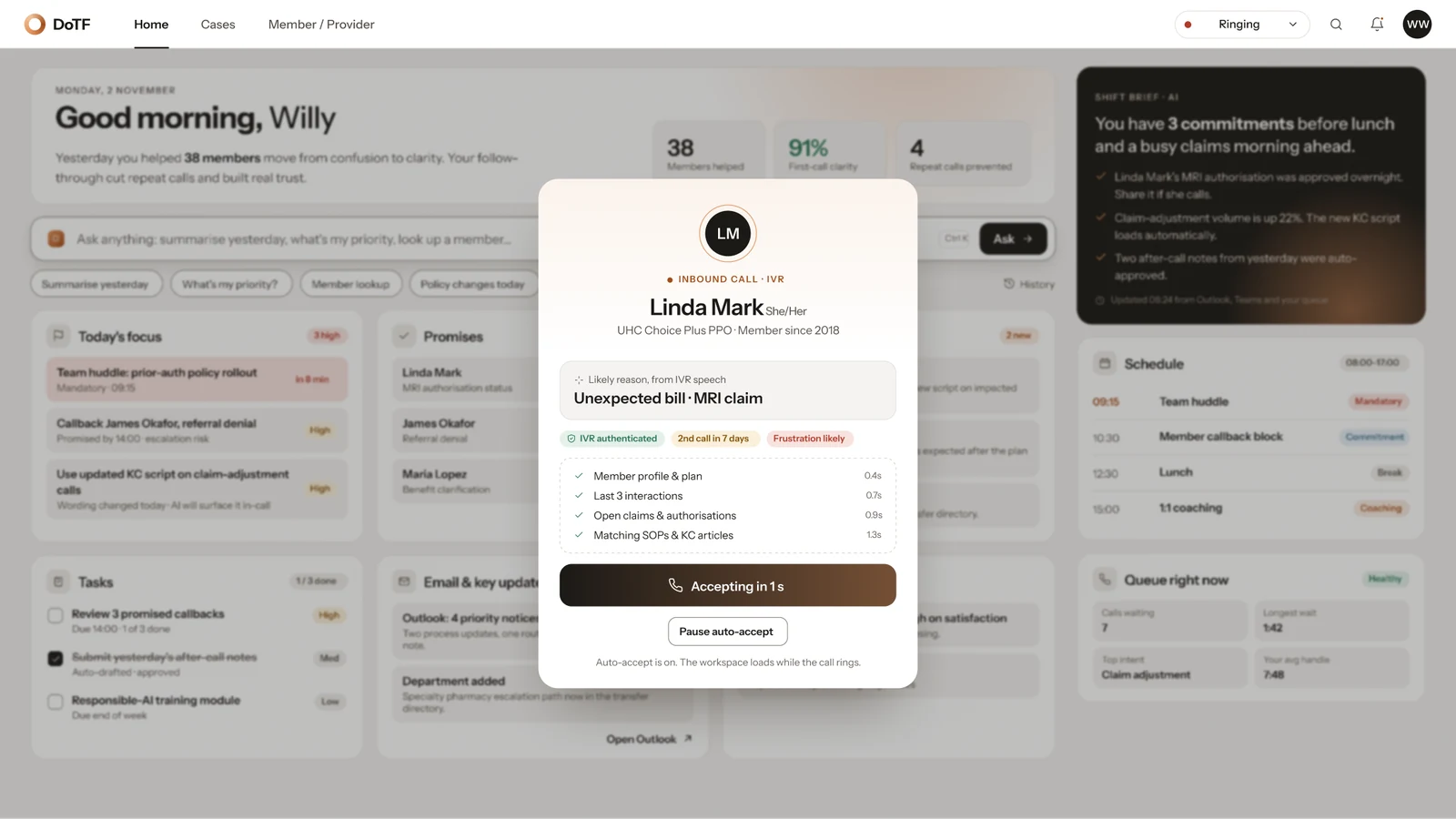
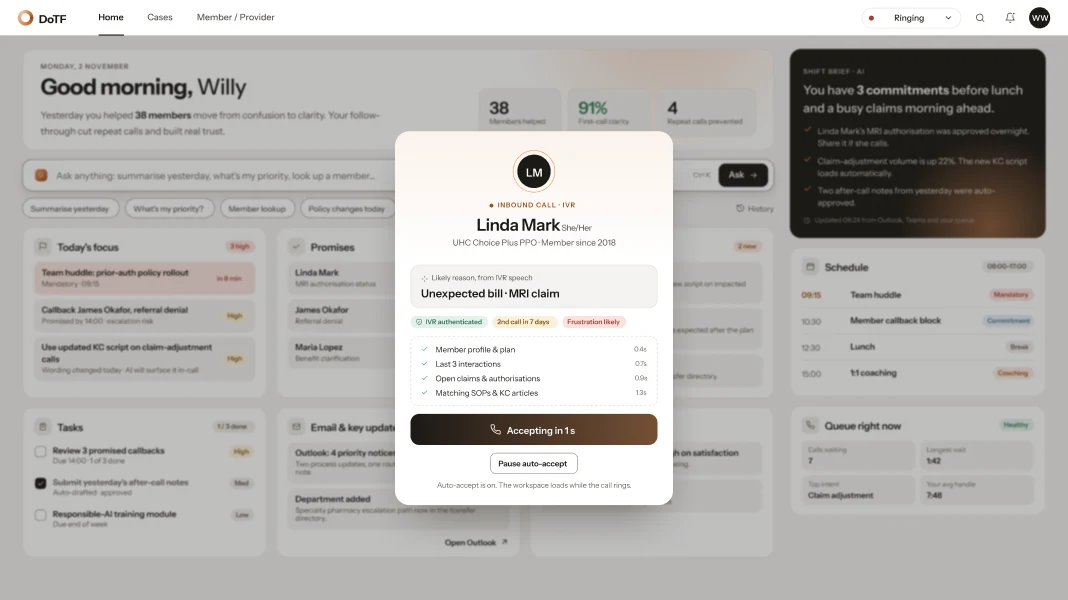
Know it's a repeat call before you say hello
The call card shows who, why and the risk. Linda is calling about an unexpected bill for the second time in a week, and frustration is likely.
- IVR authentication and likely intent up front
- Repeat-caller and sentiment flags
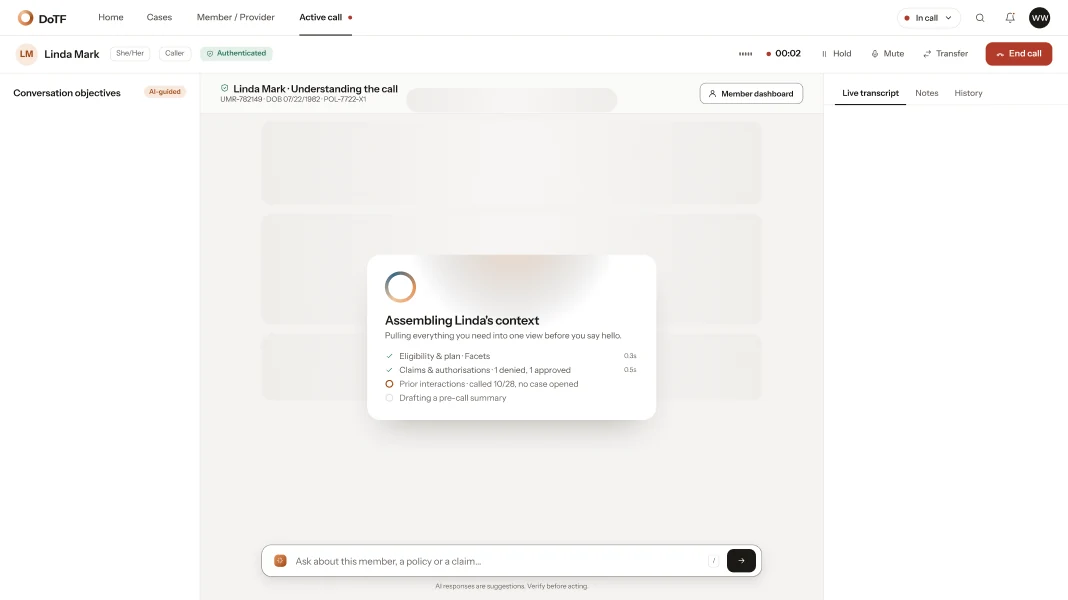
- Per-source latency while the workspace preloads
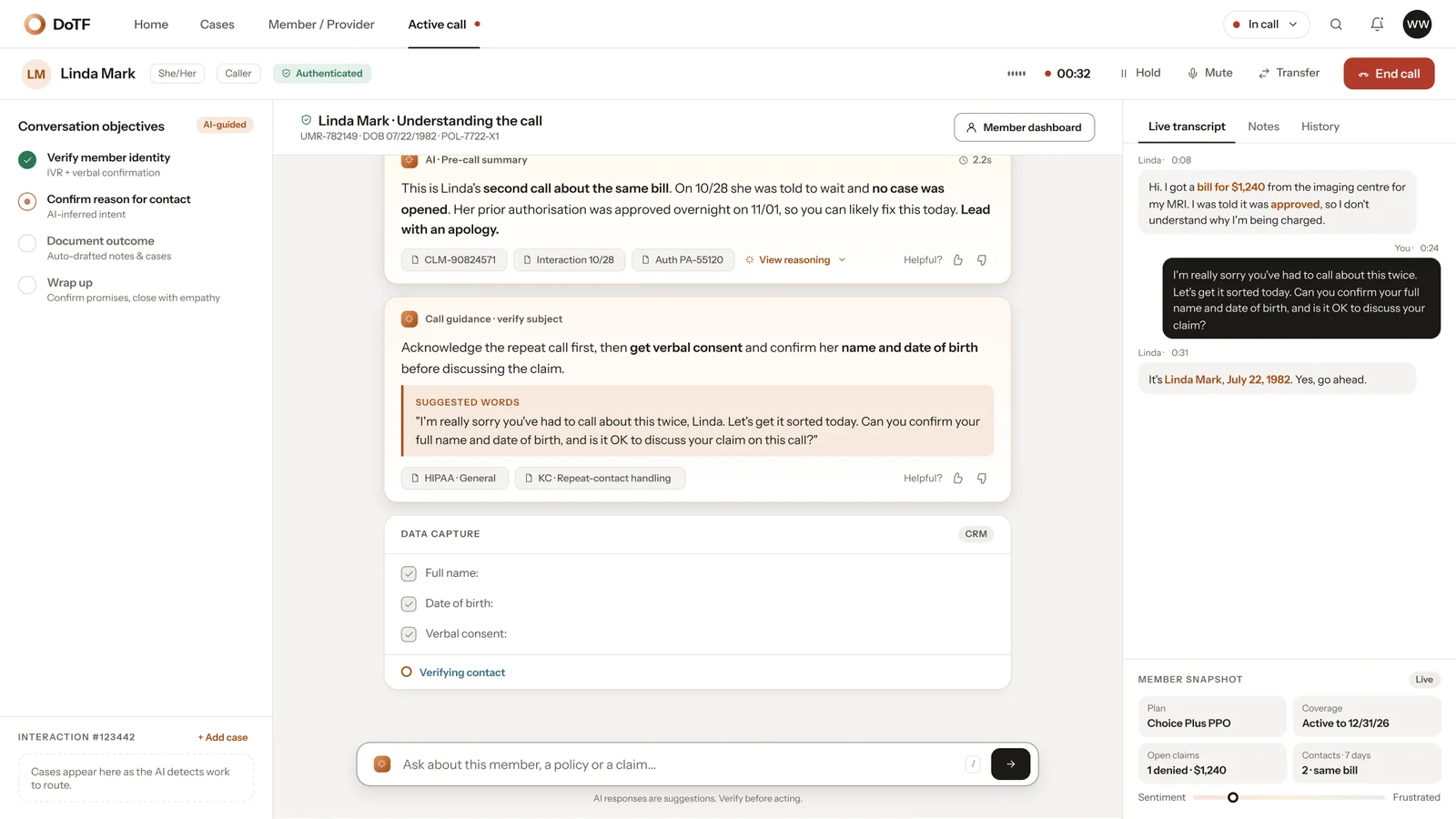
Lead with empathy, not a script
The pre-call summary tells Maya that Linda was told to wait on 10/28 and no case was opened. The next best action opens with an apology, then consent and verification.
- Pre-call summary with sources and reasoning
- Suggested words for the repeat-contact apology
- Identity auto-checked from speech
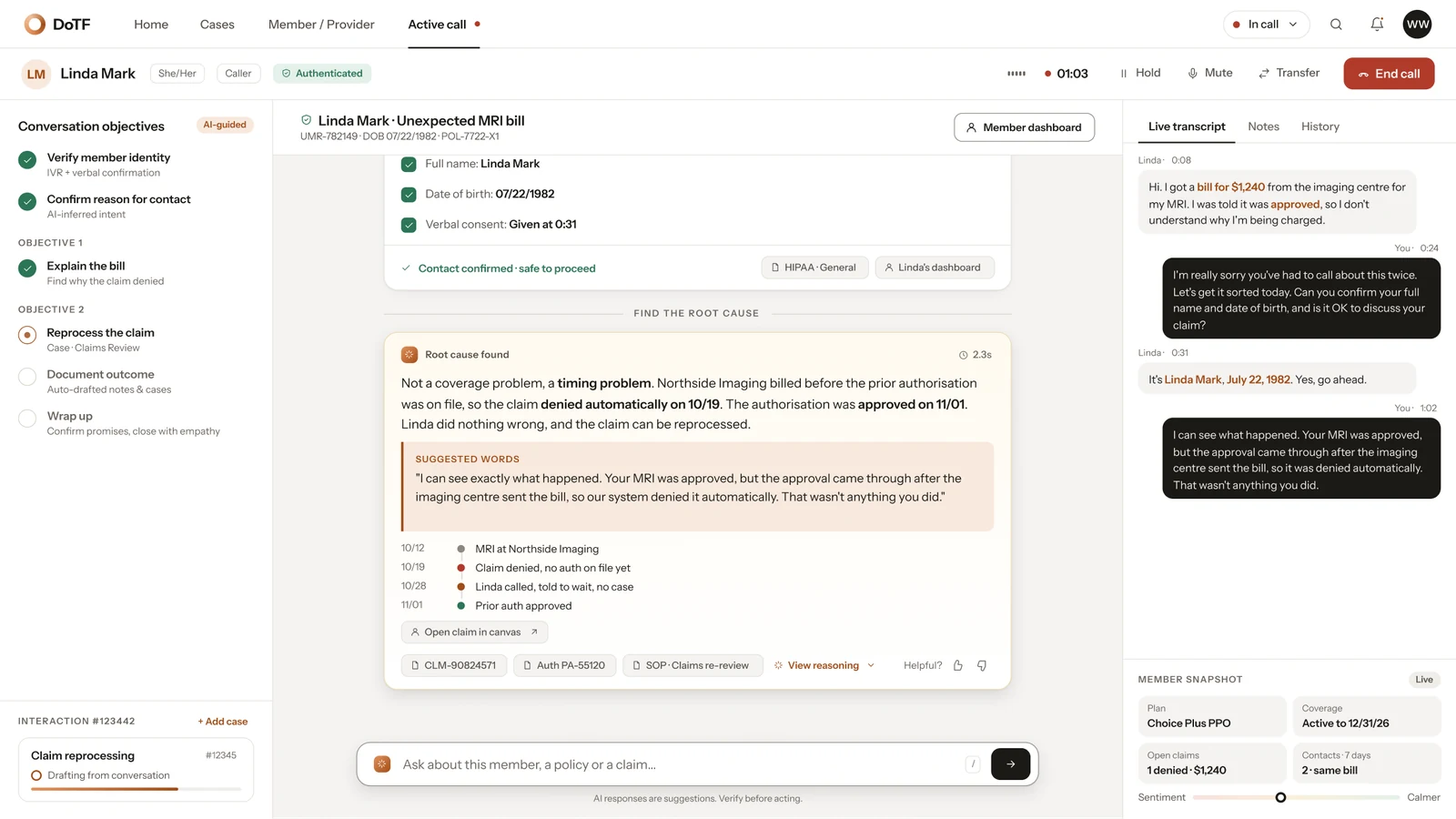
From “why was I charged?” to the answer in 2 seconds
DoTF lines up the claim, the authorisation and the dates. Not a coverage problem, a timing problem: the approval landed 13 days after the claim processed.
- Inline timeline Maya can read out
- Suggested words that take the blame off Linda
- Claim reprocessing case starts drafting immediately
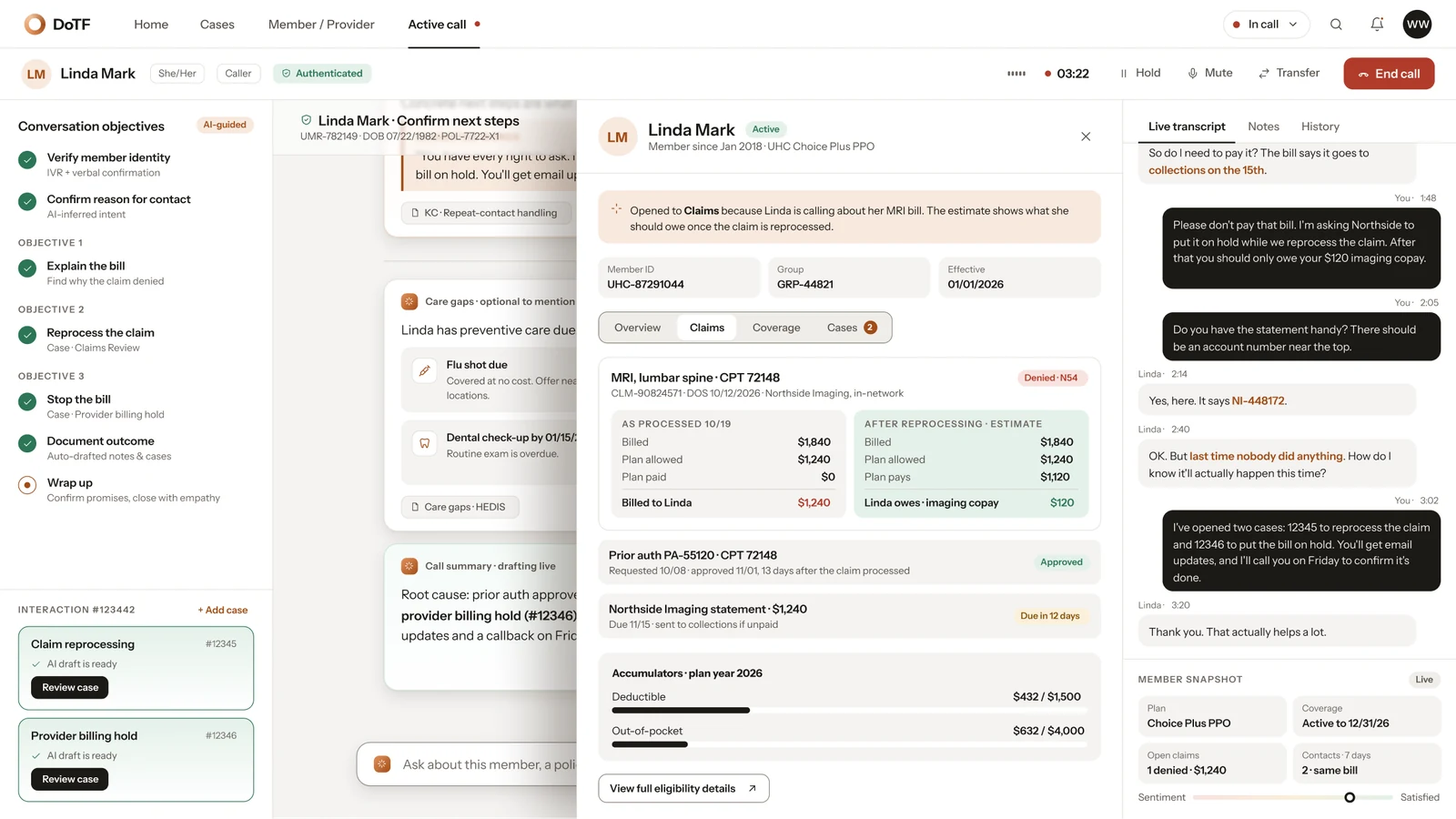
The claim comes to you
The member dashboard slides in on the Claims view, with a line saying why. It shows the claim as processed next to an estimate after reprocessing.
- $1,240 billed today, $120 copay after reprocessing
- Stops Maya from promising $0 and causing a third call
- Overview, Coverage and Cases one tap away
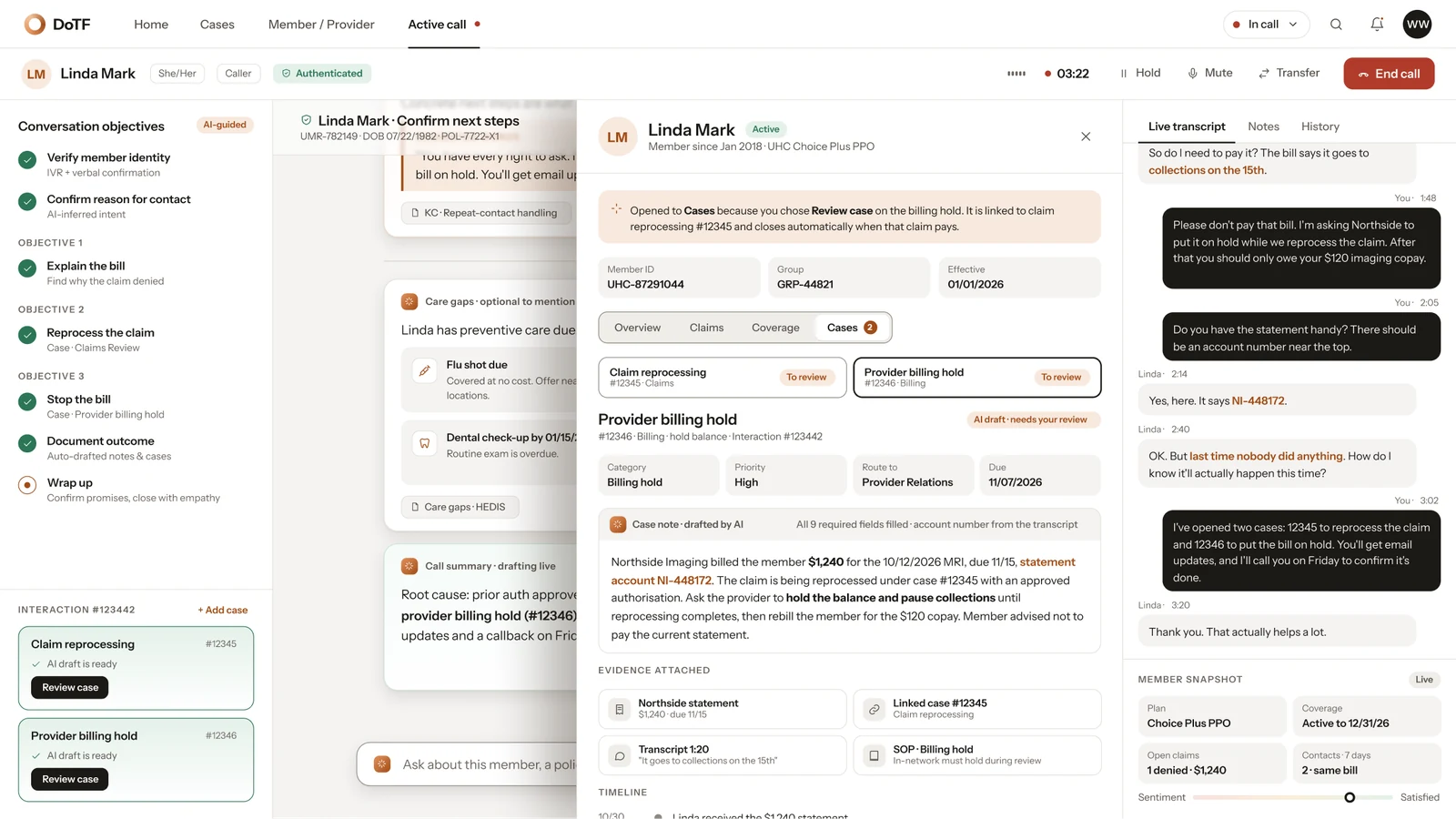
One problem, two cases, drafted while she talks
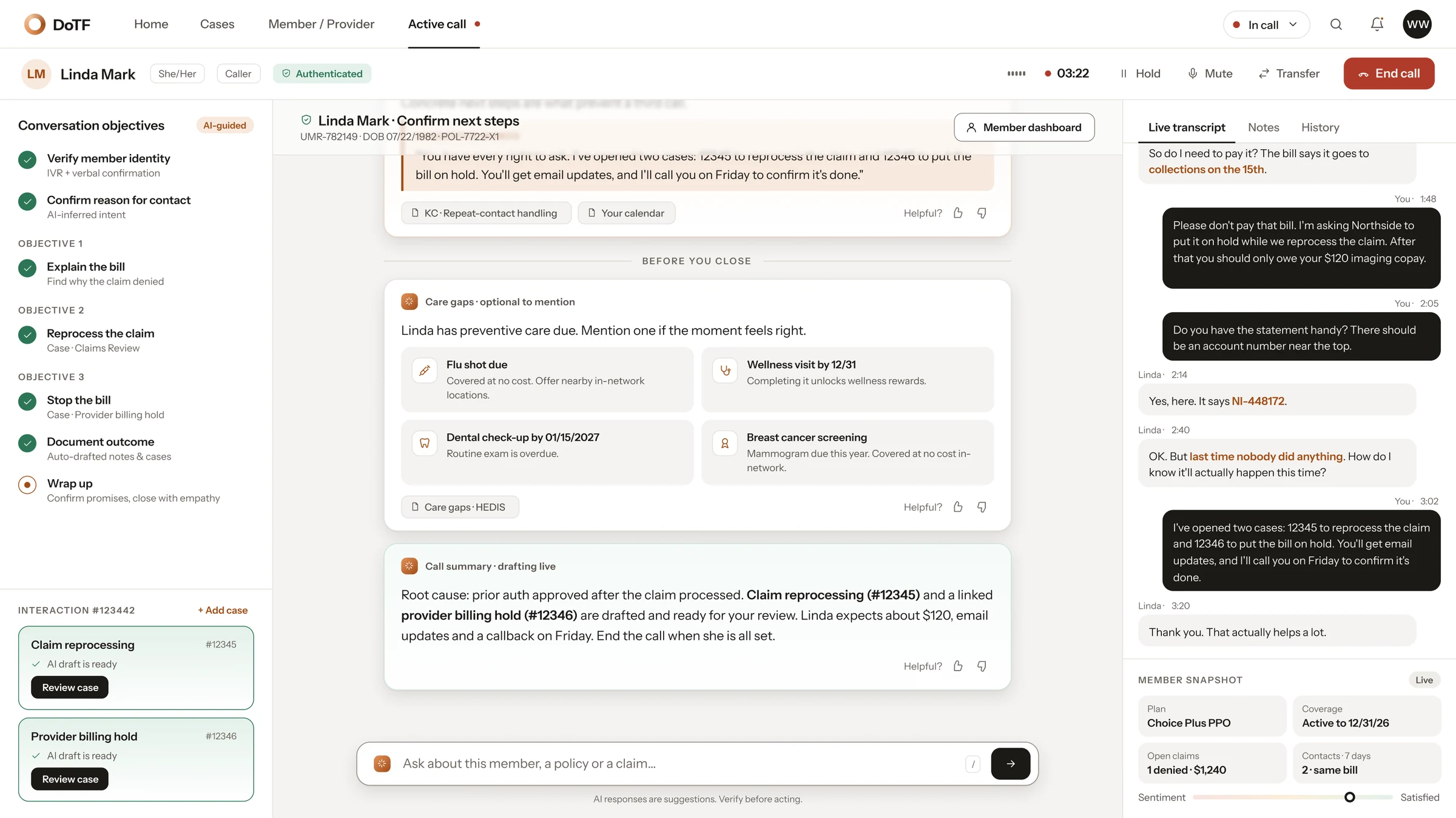
“It goes to collections on the 15th” triggers a provider billing hold, linked to the reprocessing case. The AI flags the missing account number, Maya asks, and it is captured from speech.
- Claim reprocessing #12345 to Claims Review
- Billing hold #12346 to Provider Relations, closes when the claim pays
- Review case opens the draft in the canvas: note, evidence, timeline
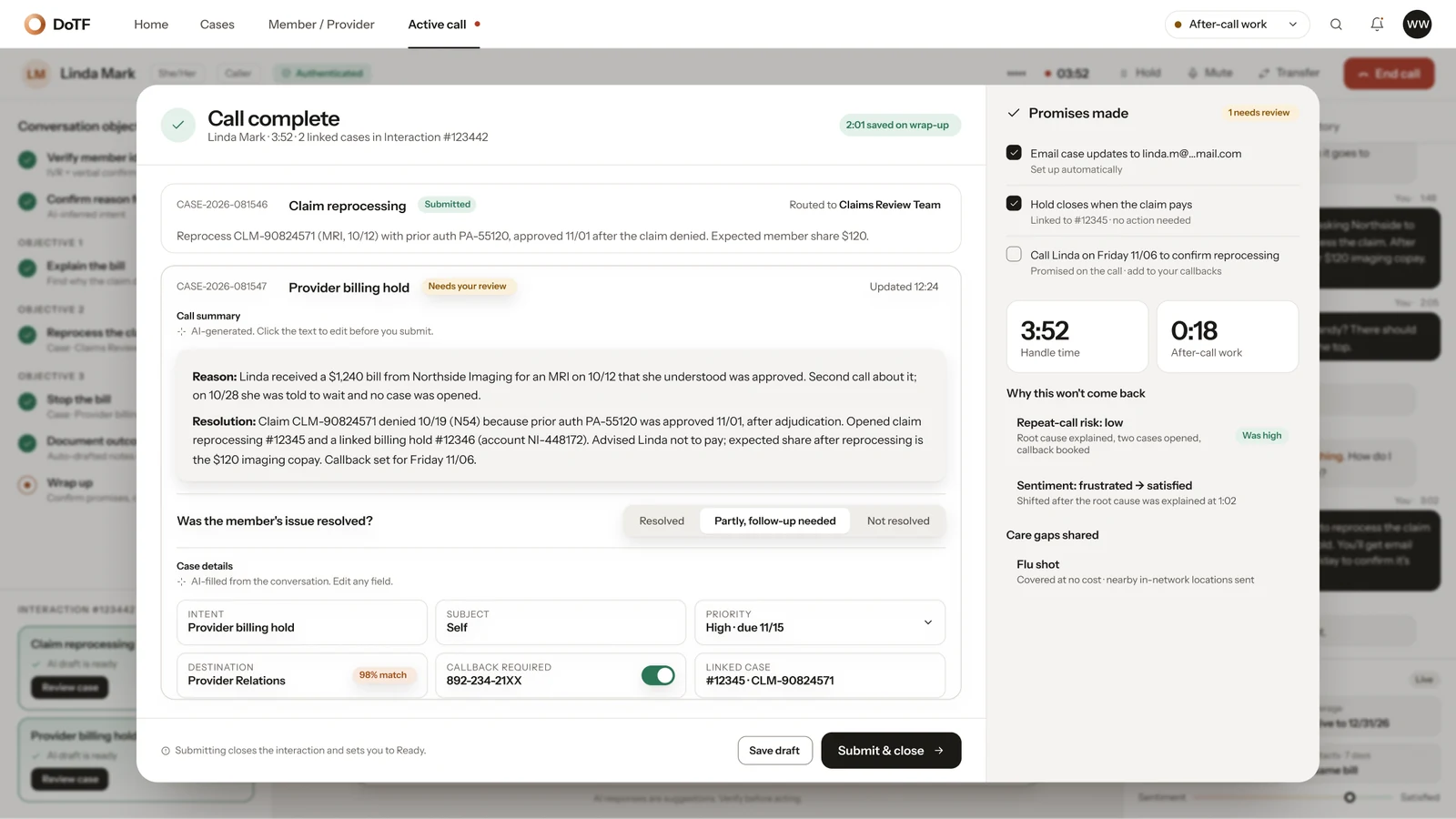
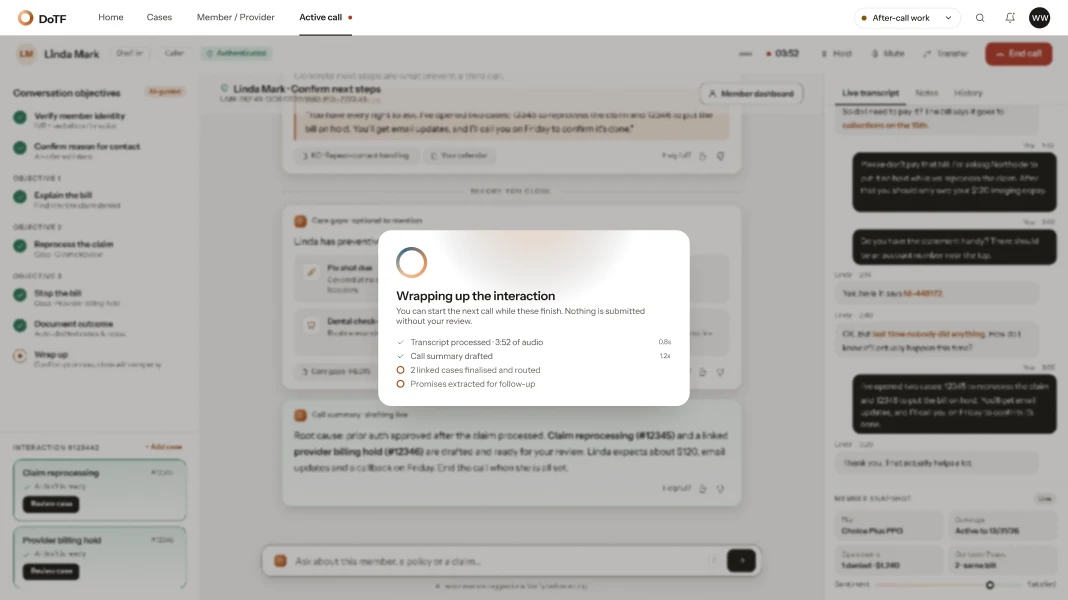
Review, don't write
After the call, Maya reviews an editable summary, confirms resolution and submits both cases. The Friday callback she promised is already on her list.
- Routing destination with a confidence match
- Promises extracted, including the callback
- Repeat-call risk shown going from high to low
- Care gaps offered before close as optional, never pushed
Transition screens that tell you what AI is doing
AI work takes seconds, and a call cannot pause. Each wait became a status screen that lists the steps, ticks them off with timings and lets the advocate keep going.
Where the minutes come back.
Baselines come from research. The “with DoTF” figures are from the prototype's end-to-end scenario and show the target the design is built around.
Summary, cases and follow-ups drafted during the call; the advocate reviews and submits.
Root cause found, claim reprocessed and bill put on hold in one call, on the member's second attempt.
Claims, authorisations, provider contracts, SOPs and case tools inside one active session.
Repeat-call reduction (baseline 42%) is tracked through complete handoffs: every case carries the full summary, so the member never has to explain again.
What we chose, and what it cost.
Most decisions balanced speed against the advocate's sense of control.
Auto-accept calls
Saves seconds and lets the workspace load during the ring, but can feel like losing control.
A visible 3-second countdown, with what is loading listed, and a setting to turn it off.
Automate vs suggest
Full automation is fastest, but one wrong routing erodes trust in every later suggestion.
AI drafts and pre-fills everything; the advocate submits. Confidence is shown on routing.
Transparency vs noise
Sources and reasoning build trust, but a busy call view slows people down.
Source chips always visible; reasoning collapsed behind one tap.
One workspace vs familiar tools
Replacing every legacy screen at once would block adoption and training.
An adaptive canvas that brings the right record into the call, with deep links to legacy tools.
Real time vs latency
AI steps take one to three seconds, which feels long in a live call.
Step-by-step status with elapsed time, and preloading during the ring so most waits happen before hello.
What this project taught me.
DoTF was less about a better desktop and more about the system underneath it: workflows, data and people agreeing on what AI should and should not do.
I design the system, not just the screens
My most valuable work on DoTF was in the architecture, the workflows and getting every team aligned, not only in the polished UI.
Bridging UX to business outcomes
Design is measured by its bottom line: less operational friction, more adoption, usability turned into business value.
Orchestrating alignment in ambiguity
Turning vague problems and conflicting priorities into a focused, executable product vision.
The biggest achievement was a vision where conversations, not systems, become the centre of the experience.