Built for speed. Designed for transparency. Just smooth pre‑deployment.
A guided portal that turns MyDelta deployments from manual coordination into one shared, validated checklist for IT, DB, Network, Security and Infra teams.
The shift
From detective work to a guided checklist.
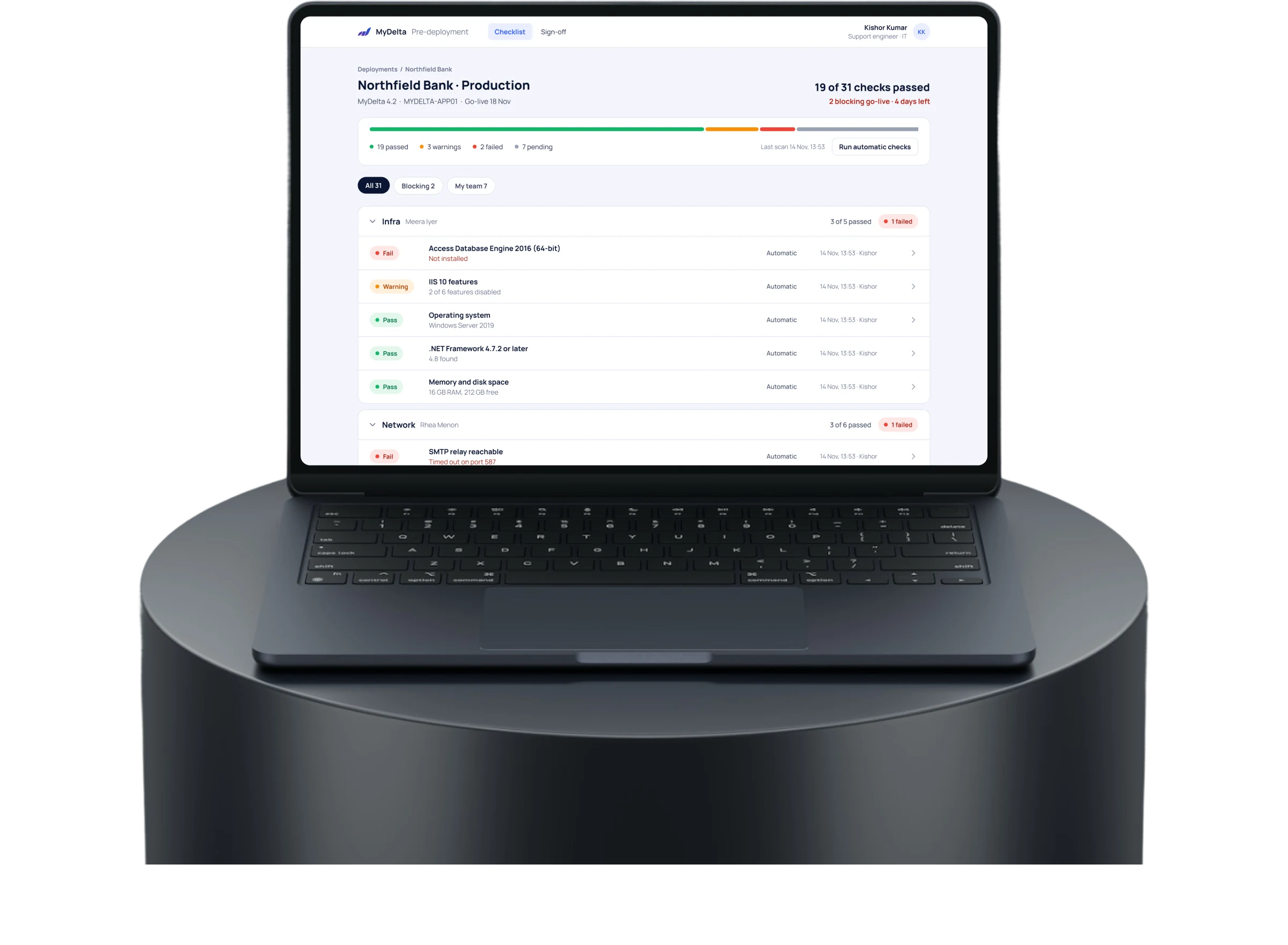
The portal removes fragmentation and manual overhead from deployment. Every team sees the same readiness status, knows what they own and gets told what is blocking go-live.
Releases move faster, with fewer errors and no guesswork, and every step leaves an audit trail stakeholders can review.
Walkthrough
Five teams, one checklist.
A one-minute walkthrough: why deployments felt like detective work, and how the portal turns them into one shared, validated checklist.
The problem
Deployments were slow, fragmented and error-prone.
Teams lost time to manual coordination, unclear responsibilities and no view of readiness. The result was wasted effort, more support tickets and low confidence that a go-live would succeed.
of deployment time went on manual follow-ups, cross-checks and validations.
Process
Four weeks. Four phases.
A fast, iterative sprint from research to a concept deck the team could build from.
User research
Interviews and shadowing, inside the deployment day.
I interviewed and shadowed the people running deployments to see their day-to-day setup, then defined user types to understand their needs.
users interviewed and shadowed
insights synthesised
pain areas identified
- Planning & Preparation
- Role-based checklist
- Infrastructure readiness
- Stakeholder coordination
- User & Permission Setup
- Create domain users
- Assign roles
- Validate permissions
- Software Installation
- Install .NET, IIS, SQL Server
- Run dependency checker
- Enhance installer UI
- SMTP & Email Configuration
- Set up SMTP relay
- Validate credentials
- Test email functionality
- DNS & Network Setup
- Manage DNS propagation
- Configure VPN/firewall
- Conduct connectivity diagnostics
Predeployment workflow
- Database Configuration*
- Set up ports
- Allocate storage
- Run DB health checks
- Application Server Setup
- Validate SSL certificates
- Resolve port conflicts
- Complete app installation checklist
- Security Setup
- Configure proxy/firewall/AV exceptions
- Ensure binaries are signed
- Create AV exception templates
- Hardware Provisioning
- Allocate CPU/RAM/disk
- Monitor resource usage
- Set up capacity alerts
- Go-Live Readiness
- Conduct final sanity checks
- Set up monitoring dashboard
- Test connectivity utilities
Challenges → Goals
Every pain point became a design goal.
Siloed visibility
Teams had no single source of truth for deployment progress, which led to misalignment and uncertainty.
Unify visibility across all teams with a transparent, role-based deployment portal.
Manual overhead
Follow-ups, cross-checks and validations consumed up to 30% of deployment time.
Reduce manual effort with automated environment and permission checks.
Reactive firefighting
Support tickets surged after deployment because of overlooked configurations and missed readiness steps.
Ensure accountability with exportable audit reports and diagnostic tools that prevent common setup errors.
Low go-live confidence
Missing pre-checks and manual validations increased last-minute issues.
Build confidence in go-live readiness with real-time validation and progress tracking.
Communication gaps
Poor information flow caused redundant effort and missed dependencies.
Align IT, DB, Network, Security and Infra teams in one interface.
Insights
What we heard, ranked by pain.
Lack of shared visibility was the most cited frustration.
Manual follow-ups consumed 20–30% of deployment time.
Miscommunication between teams led to redundant work.
Confidence in go-live was low because validation steps were missing.
Support tickets spiked after deployment because of overlooked configurations.
Show one shared truth, automate the checks and catch problems before go-live.
Personas
Two people, one deployment.

Meera Iyer
Infra Manager
Compliance Guardian“Every deployment feels like detective work.”
Compliant, verified, zero-error releases.
Missing validation checks and siloed communication.

Kishor Kumar
Internal Support Engineer
The Releaser“If I had one dashboard that showed readiness, I’d save half my day.”
Streamlined deployment, visibility and automation.
Manual coordination and unclear readiness.
The solution
A pre-deployment portal that does the checking for you.
Guided steps
Walks every user through each deployment stage, with a persistent progress bar.
Automated checks
Verifies environments and permissions without manual cross-checks.
Live readiness
Real-time feedback and readiness status for every team.
Role-based views
Tailored views for IT, DB, Network, Security and Infra.
Diagnostic tools
SMTP tester, SSL validator and DNS checker built in.
Audit-ready reports
Exportable reports for audits and stakeholder reviews.
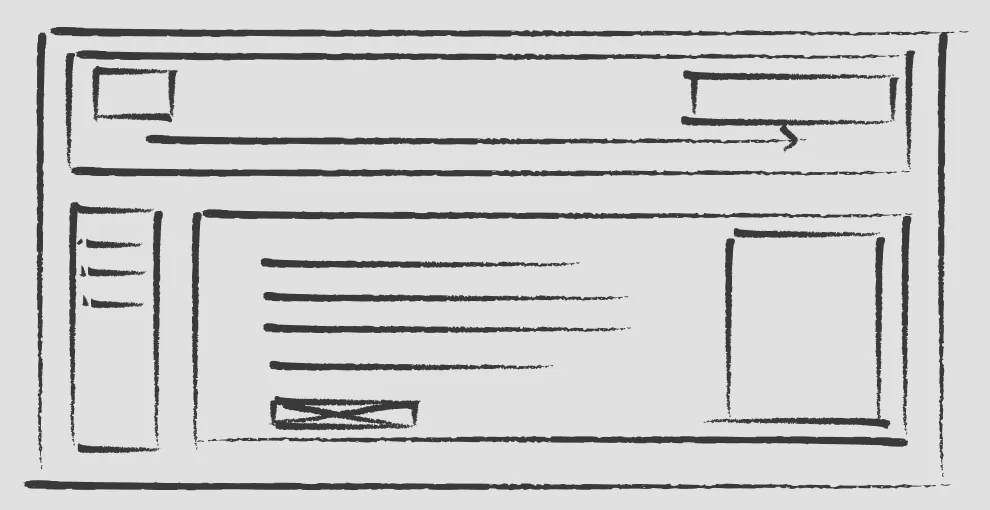
Key sketch
Two columns, one progress bar.
- A persistent progress bar keeps overall readiness in view on every screen.
- The left column lists the stages; the right shows the work and its context.
- Users move through deployment stages with quick access to the metadata they need.
UI language
One status system, read at a glance.
Every check, team and step uses the same four states. It's the backbone of the high-fidelity screens.
Check verified. Nothing to do.
Works, but needs a look before go-live.
Blocks deployment. Owner is notified.
Waiting on a team or a dependency.
Direction
The flow, screen by screen.
The concept follows the key sketch: a two-column layout anchored by a persistent progress bar, so users always know where they are and what's next.
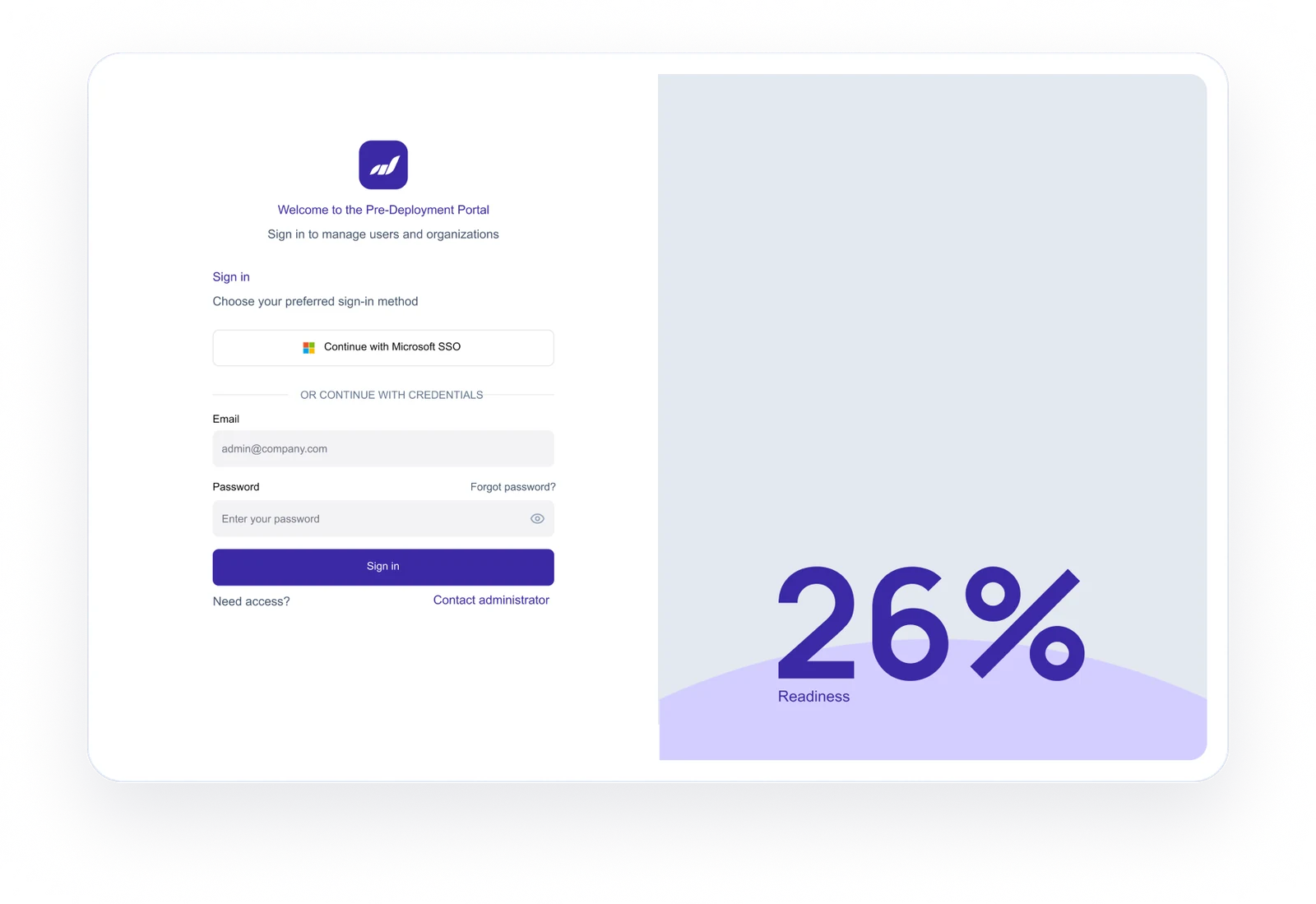
Sign in
A clean sign-in with secure options and system readiness shown upfront.
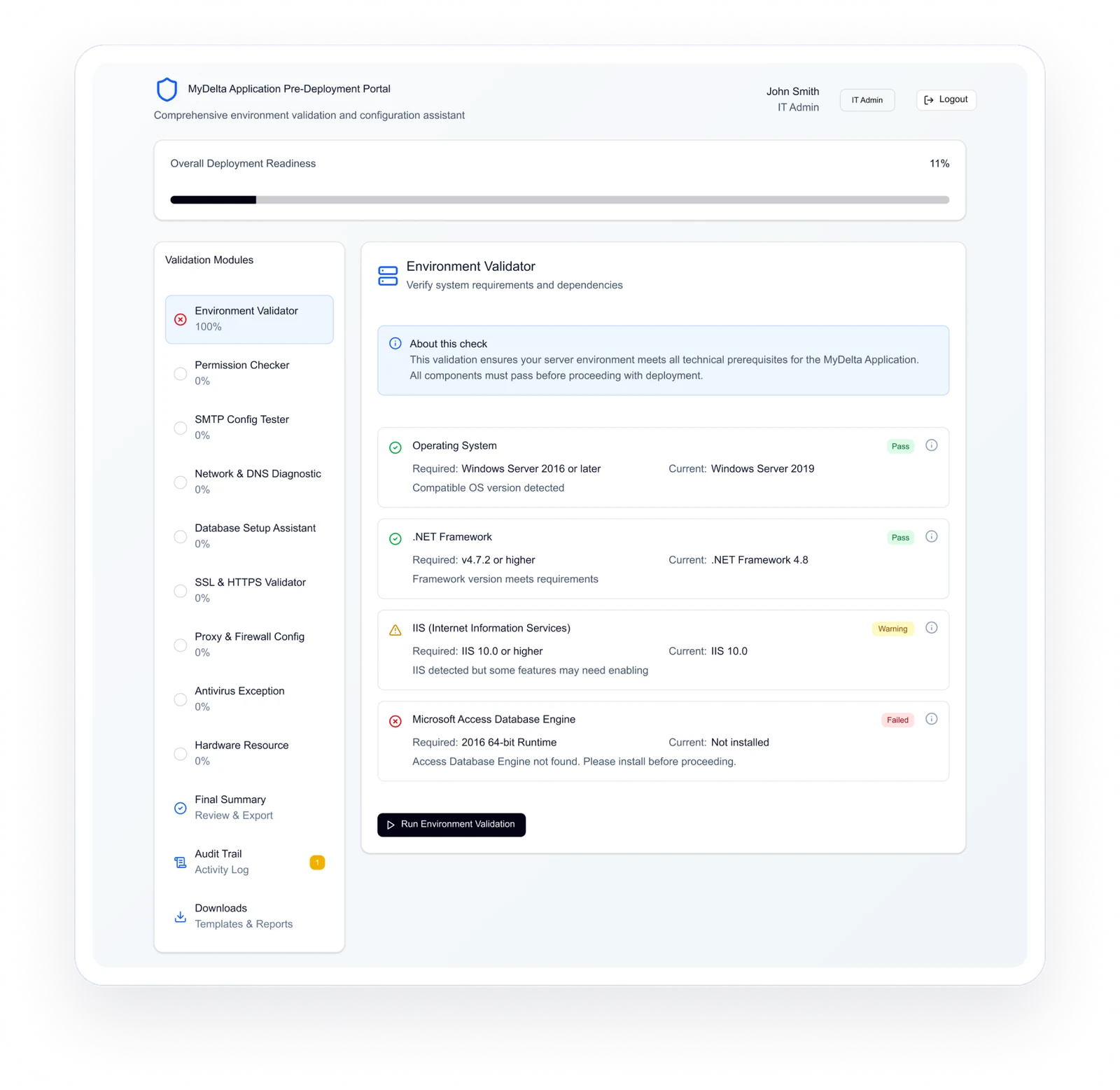
Validation module
Checks system readiness and shows pass, warning or fail for every prerequisite before deployment.
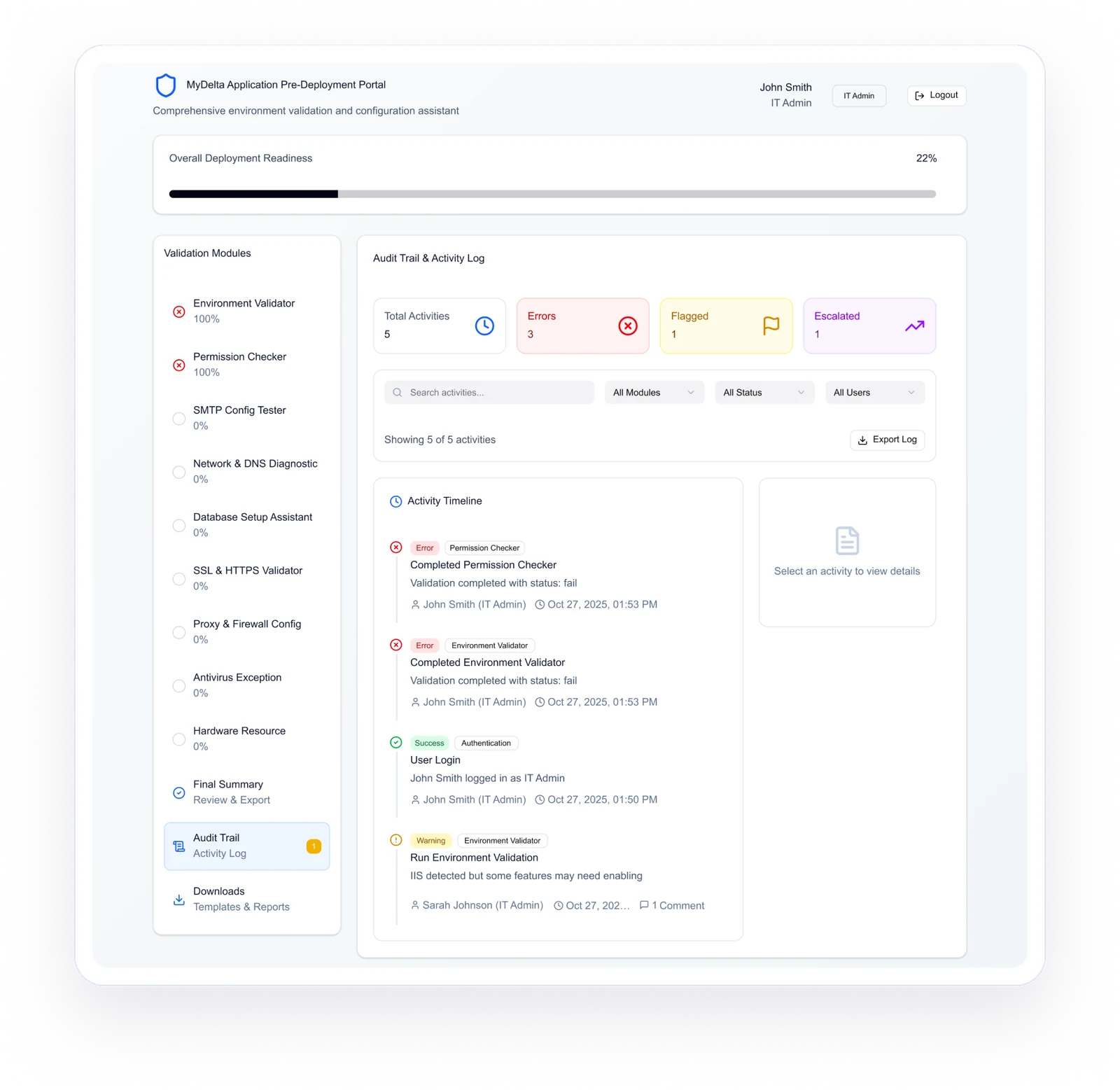
Audit trail and activity log
A clear timeline of validations, highlighting errors, flagged issues and escalations for quick troubleshooting.
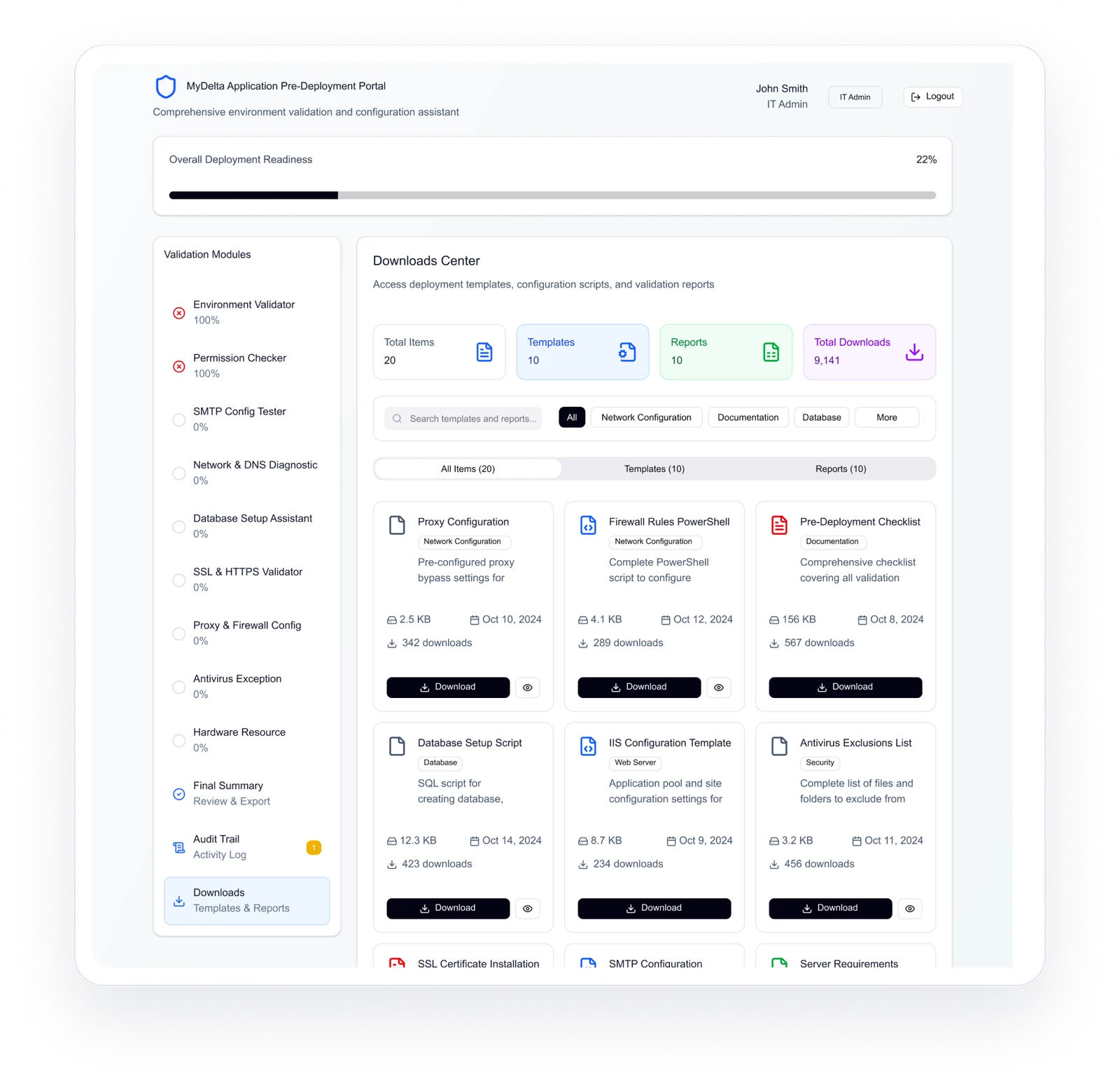
Resource hub
Ready-to-use templates, scripts and reports to speed up configuration.
High-fidelity
One checklist per deployment.
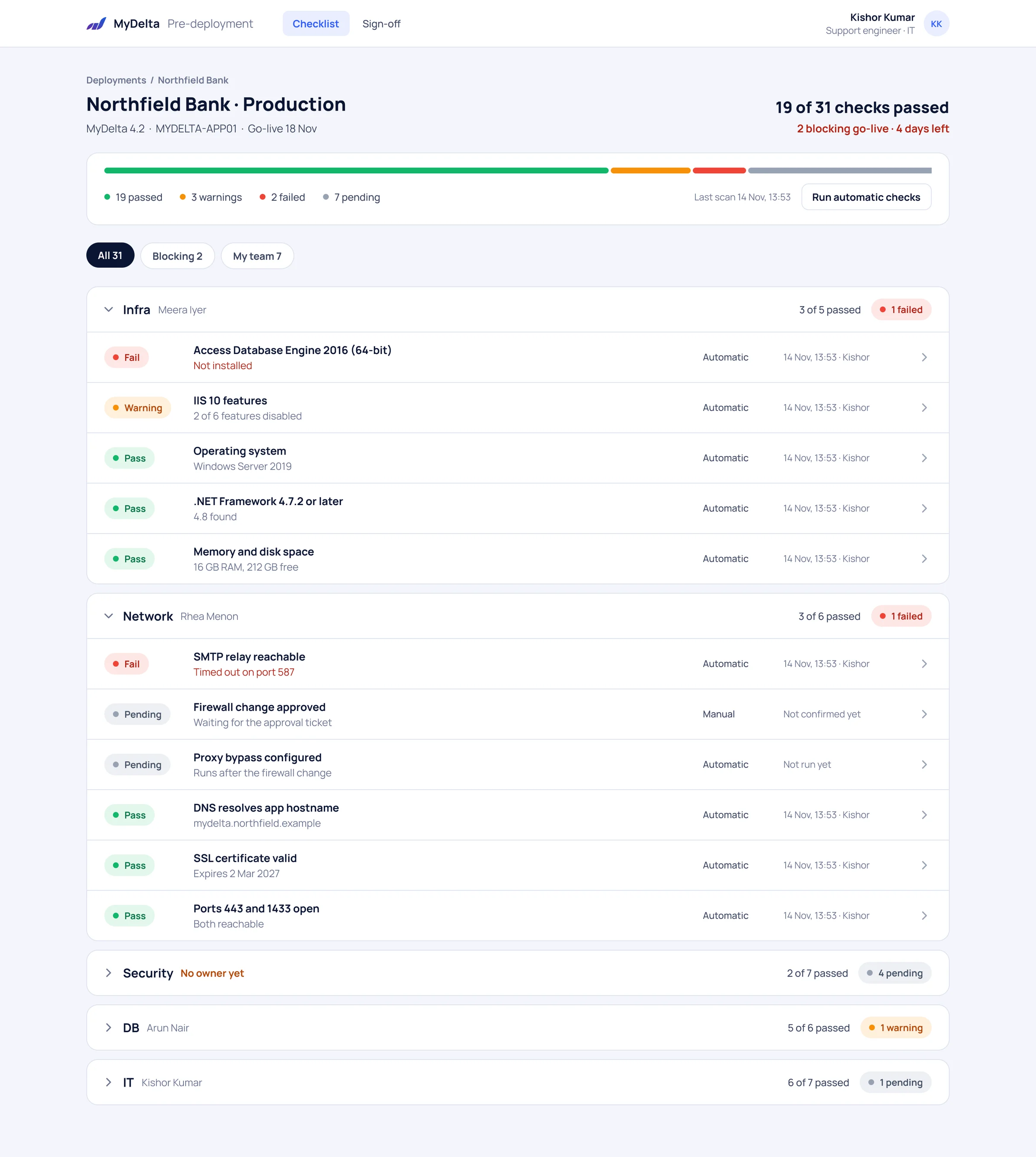
MyDelta installs on the customer's Windows Server, so the refined screens drop the module-by-module wizard. Each deployment gets a single checklist, grouped by team and written in the four-state language above.
One place to look
Every check for a deployment sits on one list, so nobody hunts across modules.
Every check has an owner
Teams carry a named owner, and an unowned team is called out in the list.
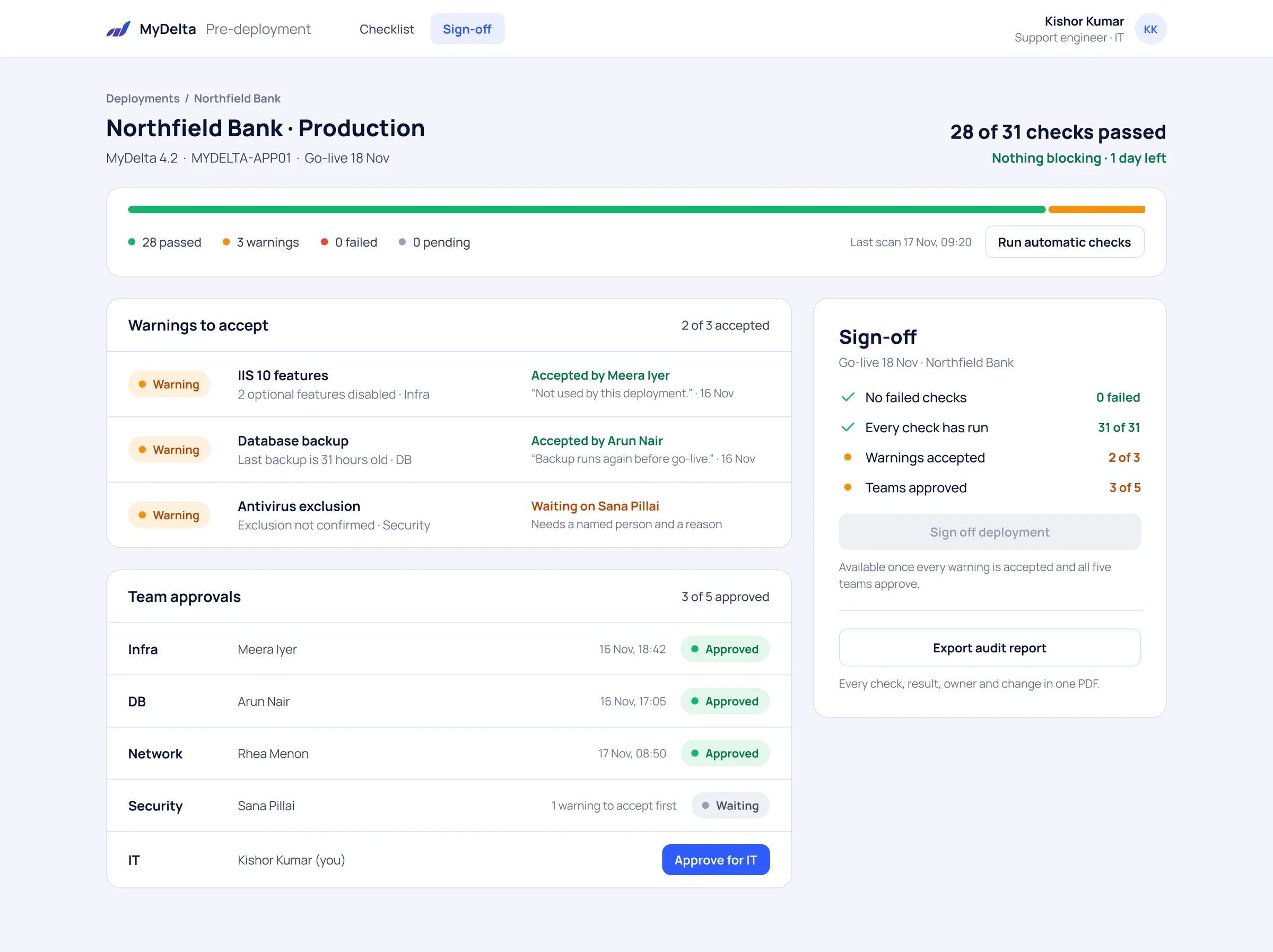
Sign-off is earned
Go-live unlocks only when nothing fails, warnings are accepted and all five teams approve.
Readiness
- The header answers the first question: 19 of 31 checks passed, 2 blocking go-live, 4 days left.
- A segmented bar shows passed, warnings, failed and pending in one line, with the last scan time and a button to run the automatic checks again.
- Checks are grouped by team with their owner. Teams with a failed check open by default; the rest stay collapsed with a one-line summary.
Check detail
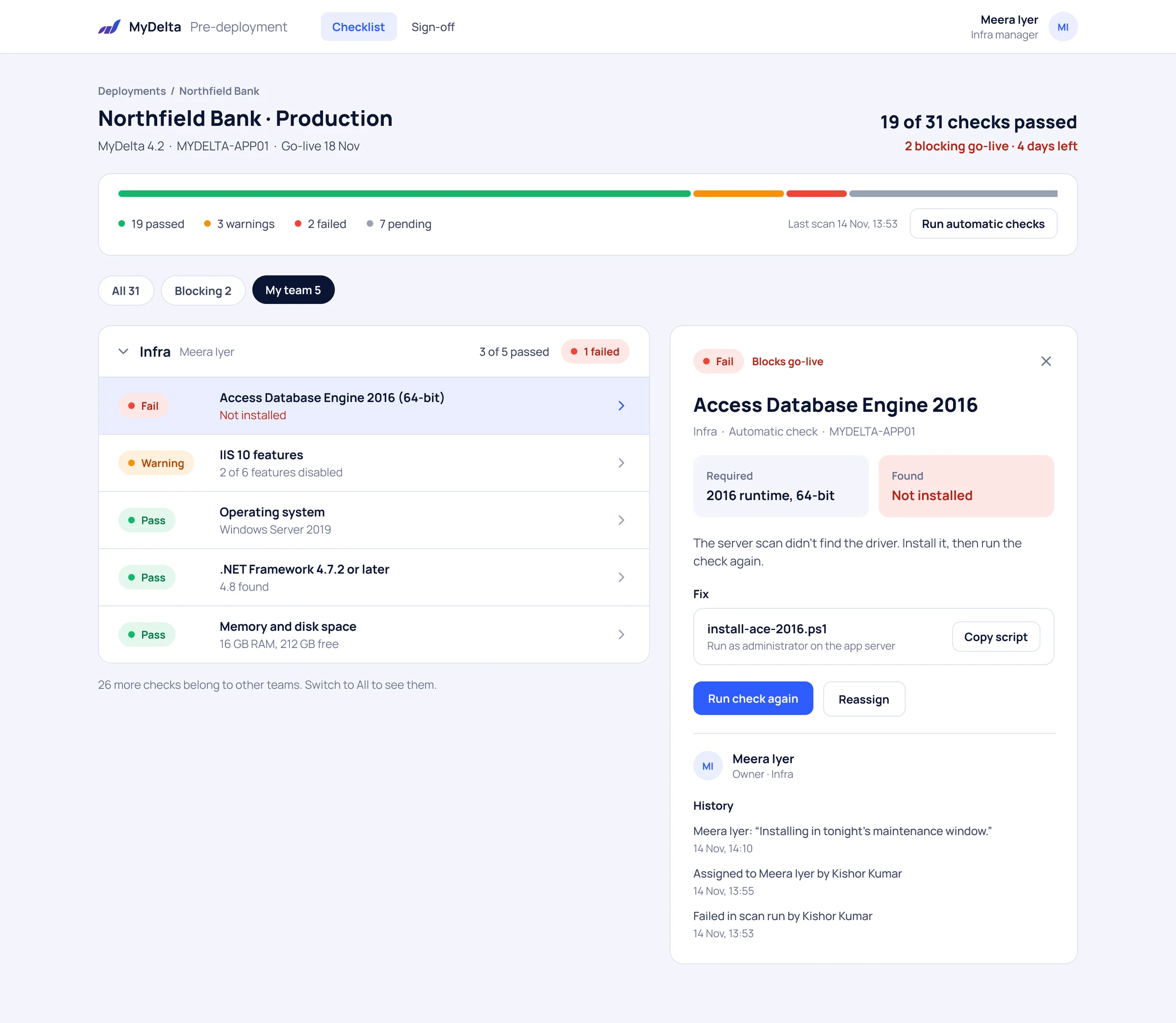
- “My team” narrows the list to the five Infra checks Meera owns.
- The detail panel puts required next to found, says why it failed and gives the fix: a script to copy and run on the app server.
- Run the check again or reassign it in place. The history shows who ran, assigned and commented, and when.
Sign-off
- Warnings don't block, but each one needs a named person and a reason before go-live.
- Team approvals show who approved and when, and what a team is still waiting on.
- The sign-off button stays disabled until every condition is met. The audit report exports every check, result, owner and change as one PDF.
What I’m designing next
Diagnostic tools
SMTP tester, SSL validator and DNS checker in one panel.
Persona: MeeraTeam handoff
Assign owners, track dependencies and notify the next team.
Persona: KishorAudit report export
Exportable, shareable report for audits and stakeholders.
Both
What success looks like
Targets to measure after launch.
Less manual follow-up
Bring the 20–30% of time spent on follow-ups down, measured per release.
Fewer post-deployment tickets
Track support tickets in the first two weeks after go-live.
One source of truth
All five teams working from the same readiness view.